April 10, 2026 • 3:35 AM ET
As of the most recent IRS filing season update (IR-2026-43), over 80% of refunds are being issued in fewer than 21 days with an average refund of $3,571.
Checking your IRS refund status is the single most common action Americans take during tax season, yet most taxpayers use only one of the four available tools and miss critical information the others provide.
The IRS offers four distinct ways to track a refund: the Where’s My Refund online tool, the IRS2Go mobile app, your IRS tax account transcript, and the automated refund hotline. Each tool shows different information at different stages of the refund process.
Understanding which tool to use at which stage is the difference between knowing exactly where your money is and refreshing a status page that tells you nothing useful.
This guide covers all four tools, explains what each status code means, and tells you exactly when to stop checking and start calling. The IRS refund status system is more transparent than most people realize once you know where to look.
Where’s My Refund: The IRS Primary Tracking Tool
The IRS Where’s My Refund tool at irs.gov/refunds is the starting point for most taxpayers. To access it, you need three pieces of information: your Social Security number or Individual Taxpayer Identification Number, your filing status (single, married filing jointly, head of household, etc.), and your exact refund amount as shown on your return.

The tool becomes available 24 hours after the IRS accepts an e-filed return, or approximately four weeks after mailing a paper return. Once available, it shows one of three statuses.
Return Received means the IRS has your return in its processing queue. No review has occurred yet. No refund calculation has been made. This status can persist for the entire 21-day standard processing window without indicating any problem. The most important thing to understand about this status is that it tells you nothing about your refund timeline. It simply confirms the IRS has your return.
Refund Approved means the IRS has processed your return, confirmed your refund amount, and scheduled payment. A deposit date may appear. At this stage, your refund has entered the disbursement pipeline through the Bureau of the Fiscal Service at the U.S. Treasury. Your money is on its way. The complete refund processing pipeline is detailed in the refund processing guide.
Refund Sent means the IRS has transmitted payment instructions to the Treasury. The status sometimes jumps from Approved to Sent without showing a deposit date. This is a display anomaly in the tool, not a payment cancellation.
When your IRS refund status shows Sent, your deposit typically posts within one to five business days depending on your bank. If the deposit does not appear within five business days, the detailed explanation of why this happens is in the balance delay guide.
One common issue: the WMR status bar sometimes disappears entirely during the transition between Approved and Sent. This is a known display problem in the WMR application. It does not mean your refund was cancelled, reversed, or flagged. When this happens, the solution is to check your IRS transcript directly.
IRS2Go Mobile App: Refund Tracking on Your Phone
The IRS2Go app is the official IRS mobile application available on iOS through the App Store and on Android through Google Play. It provides the same IRS refund status information as the Where’s My Refund website in a mobile-friendly format. You enter the same three pieces of information: SSN, filing status, and exact refund amount.
The app also provides access to free tax preparation tools, links to IRS Free File, and the ability to make tax payments. For most taxpayers, the IRS2Go app is the most convenient way to check refund status because it is accessible from the same device they are most likely checking repeatedly during the waiting period.
The app shows the same three statuses as the web tool. It updates at the same frequency. It does not provide earlier or more detailed information than the website. If the web tool shows Return Received, the app will show Return Received. There is no advantage to checking one over the other for status purposes.
IRS Tax Account Transcript: The Most Detailed View
Your IRS tax account transcript provides substantially more information than Where’s My Refund and is the tool that serious refund trackers should learn to use. Access your transcript at irs.gov under “Get Transcript” or through your IRS online account. You will need an IRS Individual Online Account with ID.me verification to access transcripts online.
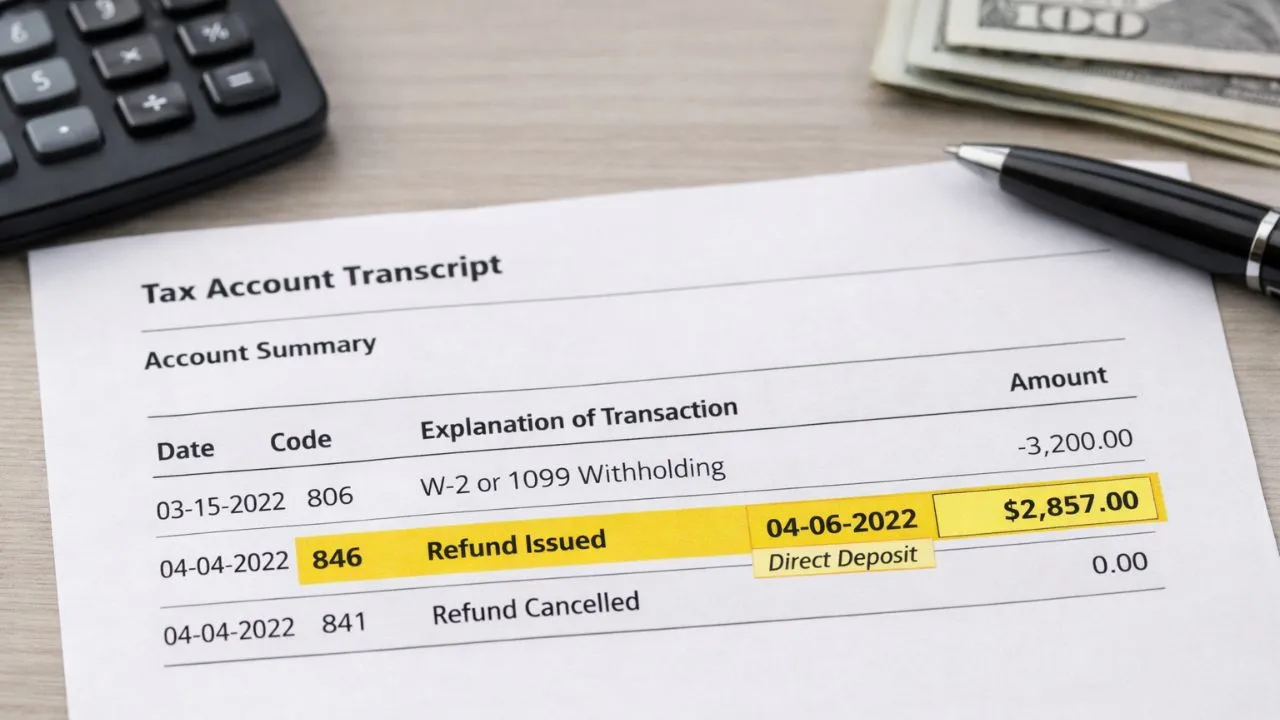
The transcript shows transaction codes that reveal exactly what the IRS has done with your return at each stage. The most important code is Transaction Code 846, which means Refund Issued.
When Code 846 appears on your transcript with a date, your refund has been authorized and the payment is scheduled for that date. No other code confirms that your refund has been released. The complete breakdown of Code 846 and every other relevant transcript code is in the Code 846 guide.
Code 570 on your transcript means Additional Action Pending. This indicates the IRS has placed a hold on your refund before it can be finalized. Code 570 often precedes Code 971, which means Notice Issued. If you see Code 570 without Code 971, a notice is likely being prepared and will arrive by mail. Do not call the IRS about Code 570 until you have received and reviewed the physical notice.
Code 150 means Return Filed and indicates your return is in the processing queue. Code 768 indicates Earned Income Credit Posted. Code 776 indicates Interest Credited, meaning the IRS has applied interest to a delayed refund under IRC Section 6621.
The Automated Refund Hotline and When to Call a Live Agent
The IRS automated refund hotline at 1-800-829-1954 provides the same information as Where’s My Refund through a phone-based system. You enter your SSN, filing status, and refund amount using your phone keypad and receive an automated status update. This hotline is useful when you cannot access the internet or when the IRS website is experiencing heavy traffic during peak filing season.
Do not call the IRS live agent line at 1-800-829-1040 about a refund until the standard processing window has passed. For e-filed returns, that window is 21 calendar days from IRS acceptance.
For paper returns, it is six full weeks. For amended returns (Form 1040-X), it is 16 weeks. Calling before these windows have passed produces a standard response confirming your return is being processed. It does not accelerate anything.
When you do call after the window has passed, have your SSN, filing status, exact refund amount, the date your return was accepted, and any transcript codes ready. If the IRS identifies an issue requiring your action, you may be directed to the Taxpayer Advocate Service at 1-877-777-4778 for complex cases.
Understanding where your refund sits within the broader federal payment pipeline gives additional context for why deposits take time to move from IRS approval to your bank account. The complete architecture of that system is explained in the money movement guide.
What You Should Do Now
Your IRS refund status is accessible through four tools, each showing different levels of detail. Here is the recommended sequence.
How to Check Your IRS Refund Status
- Step 1: Start with Where’s My Refund at irs.gov/refunds or the IRS2Go app. Enter your SSN, filing status, and exact refund amount.
- Step 2: If the status bar disappears or shows no information, access your IRS tax transcript through your IRS Individual Online Account. Look for Code 846 with a date.
- Step 3: If Code 846 has appeared with a date and your bank has not posted the deposit, wait five full business days from that date before taking any action.
- Step 4: If 21 days have passed since e-file acceptance with no IRS refund status change and no Code 846 on your transcript, call 1-800-829-1954 for an automated update or 1-800-829-1040 for a live agent.
- Step 5: Check your IRS refund status once per day during the 21-day window. Checking more frequently does not change anything and the data updates only once every 24 hours. For the latest updates, refer to IRS filing updates.
Editorial Note: Investozora is an independent news publication. This content is for informational purposes only. For official guidance, please visit the relevant .gov website.